

Complete Guide to MAG544w3 Remote Control: Features, Functions & Setup (2026)
If you use a MAG IPTV box daily, the remote control plays a bigger role than you might think. The MAG544w3 remote control is designed to deliver fast navigation, precise control, and smooth interaction with IPTV menus, apps, and system settings. In 2026, users expect instant response, simple shortcuts, and zero learning curve—and that’s exactly what the MAG remote delivers.
This complete guide explains how the MAG544w3 remote works, what each button does, how to set it up correctly, and how to fix common issues. Whether you’re replacing an old remote or setting up a new one, this guide covers everything you need.
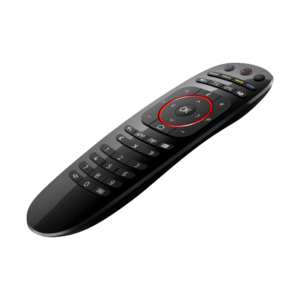
👉 Buy MAG Remote Control Here: Remote Control for MAG424, MAG524, MAG54
What Is the MAG544w3 Remote Control?
The MAG544w3 remote control is an original-style IPTV remote designed for MAG series set-top boxes. It offers responsive button feedback, dedicated navigation keys, and optimized layout for Linux-based MAG interfaces.
This remote is widely used with MAG IPTV boxes because it provides:
-
Quick channel switching
-
Easy menu access
-
Reliable long-range signal
-
Comfortable one-hand use
It’s ideal for users who want a simple, no-lag IPTV control experience without complicated pairing steps.
Key Features of the MAG544w3 Remote Control
The MAG544w3 remote is built for everyday IPTV usage and long viewing sessions.
Highlights include:
-
Dedicated navigation buttons for IPTV menus
-
Numeric keypad for fast channel access
-
Media playback controls (play, pause, rewind, fast-forward)
-
Ergonomic button layout
-
Strong IR signal for stable response
-
Lightweight and durable design
These features make it one of the most practical IPTV remotes available in 2026.
MAG544w3 Remote Control Button Functions Explained
Understanding the button layout helps you use the remote faster and more efficiently.
Main button groups:
-
Navigation arrows & OK – Move through menus and confirm selections
-
Numeric keys (0–9) – Jump directly to channels
-
Menu & Back buttons – Access settings and return quickly
-
Volume & channel controls – Adjust audio and switch channels
-
Playback buttons – Control live TV, recordings, and VOD
Each button is optimized for IPTV usage, minimizing unnecessary clicks.
How to Set Up MAG544w3 Remote Control
Setting up the MAG544w3 remote is quick and user-friendly for beginners.
Basic setup steps:
-
Insert fresh AAA batteries
-
Point the remote toward your MAG box
-
Power on the device
-
Start navigating—no pairing required
The remote uses infrared (IR) technology, so setup is instant with compatible MAG devices.
MAG544w3 Remote Control Pairing Process
Most MAG544/ MAG544w3 remotes do not require Bluetooth pairing. They work instantly using IR.
If the remote doesn’t respond:
-
Check battery orientation
-
Ensure a clear line of sight to the box
-
Test the remote from a closer distance
Once detected, the remote functions automatically.
How to Use MAG544w3 Remote Control for Daily Navigation
The MAG544w3 remote is designed for speed and simplicity.
Everyday tasks made easy:
-
Open IPTV portals instantly
-
Switch channels with number keys
-
Adjust volume without menu delays
-
Navigate EPG smoothly
-
Access settings in seconds
This makes it perfect for live TV, movies, sports, and international IPTV channels.
MAG544w3 Remote Control Shortcuts and Pro Tips
Get more from your remote with these simple tips:
-
Use number keys for faster channel switching
-
Hold navigation buttons for quicker scrolling
-
Use the back button instead of exiting menus fully
-
Keep batteries fresh for the best signal strength
These small habits significantly improve daily IPTV performance.
Troubleshooting MAG544w3 Remote Control Issues
If your remote stops working, try these fixes:
Common solutions:
-
Replace batteries
-
Clean the IR sensor area
-
Restart your MAG box
-
Check for physical damage
-
Ensure no objects block the signal
Most issues are power- or signal-related and easy to fix.
MAG544w3 Remote Control Replacement Guide
If your remote is lost or damaged, replacing it is simple.
When to replace:
-
Buttons no longer respond
-
Signal drops frequently
-
Physical wear affects usability
Using a compatible replacement ensures full functionality without reconfiguration.
👉 Get a Compatible MAG Remote Control: Remote Control for MAG424, MAG524, MAG54
Why the MAG544w3 Remote Is Still Relevant in 2026
Despite newer smart remotes on the market, the MAG544w3 remote remains popular because it offers:
-
Zero learning curve
-
No pairing hassle
-
Reliable IPTV-focused design
-
Long-term compatibility with MAG devices
For users who value simplicity and reliability, it’s still a top choice.
FAQ
Is the MAG544w3 remote compatible with other MAG boxes?
Yes, it works with multiple MAG models that use IR-based remotes.
Does the MAG544w3 remote need Bluetooth pairing?
No. It uses infrared and works instantly.
Can I use this remote as a replacement?
Yes, it’s ideal as a replacement or backup remote.
What batteries does it use?
Standard AAA batteries.
Is it good for daily IPTV use?
Absolutely. It’s designed for frequent, long-term usage.
Conclusion
The MAG544w3 remote control is a reliable, easy-to-use solution for IPTV users who want smooth navigation, fast response, and hassle-free control. In 2026, it continues to be one of the most practical IPTV remotes thanks to its simple setup, intuitive layout, and dependable performance.
Whether you’re setting up a new MAG box or replacing an old remote, this guide helps you achieve the best possible experience.
👉 Buy MAG Remote Control Today: Remote Control for MAG424, MAG524, MAG54