

In 2026, desk setups are no longer just about furniture and screens—they are about efficiency, aesthetics, and smart power management. With more devices than ever, tangled cables and multiple chargers quickly destroy the clean look of a modern workspace. That’s why a 4-in-1 wireless charging station has become a must-have accessory for home offices, study desks, gaming setups, and professional workspaces.
In this guide, you’ll discover the best desk setup ideas using a Qi-certified 4-in-1 wireless charging station, along with practical styling and placement tips for every type of user.
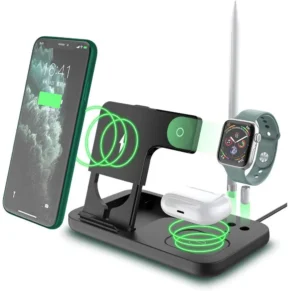
👉 Recommended product: Raxxio 4-in-1 Wireless Charger
Search trends in 2026 show growing interest in:
-
modern desk setup ideas
-
minimalist workspace design
-
cable-free charging solutions
-
productivity desk accessories
A clean desk reduces visual stress, improves focus, and makes your workspace feel more professional. A 4-in-1 wireless charging station plays a key role in achieving that balance.
What Is a 4-in-1 Wireless Charging Station?
A 4-in-1 wireless charging station is a compact dock that charges multiple devices at once—typically:
-
Smartphone
-
Smartwatch
-
Wireless earbuds
-
An additional phone or accessory
All through Qi-certified wireless charging, without messy cables. Instead of four chargers and four wires, you use one clean station.
Benefits of Using a 4-in-1 Charging Station in Desk Setups
A 4-in-1 wireless charger instantly upgrades any desk because it:
-
Reduces cable clutter
-
Saves desk space
-
Charges all daily devices in one place
-
Improves desk aesthetics
-
Supports fast Qi charging
-
Keeps devices visible and organized
It’s one of the easiest ways to make your workspace look modern and functional.
Minimalist Desk Setup with a 4-in-1 Charger
For minimalist desks, less is more.
Pair your charging station with:
-
A clean wooden or white desk
-
One monitor or laptop stand
-
Wireless keyboard and mouse
-
A small plant
Place the charging station beside your monitor or lamp. It becomes both a functional tool and a design element.
Productivity-Focused Work Desk Setup
If productivity is your priority, your desk should support fast task switching.
A 4-in-1 charging station helps by:
-
Keeping your phone upright for notifications
-
Charging your smartwatch during work hours
-
Powering earbuds for meetings
-
Removing cable distractions
Position it near your dominant hand for easy access during work.
Home Office Desk Setup Ideas
In a home office, style and comfort matter.
Use your 4-in-1 charger with:
-
Desk organizer trays
-
LED desk lamp
-
Laptop stand
-
Neutral accessories
This creates a professional look while keeping everything charged and ready.
Creative Desk Setup for Designers & Creators
Designers and creators need flexibility and inspiration.
Your desk setup can include:
-
Tablet or drawing pad
-
Colorful accessories
-
Wireless speakers
-
Mood lighting
A 4-in-1 charging station keeps devices ready for content creation, video calls, and social media management.
Student Desk Setup with Smart Charging
Students benefit greatly from a 4-in-1 charger because it:
-
Saves space on small desks
-
Keeps phone, earbuds, and watch charged overnight
-
Reduces cable mess in dorm rooms
-
Supports study and online classes
Place it near the bed or study lamp for easy daily use.
Gaming Desk Setup Using a 4-in-1 Charger
Gamers love clean setups.
A wireless charging station:
-
Matches RGB desk aesthetics
-
Keep phone and earbuds charged for voice chat
-
Reduces desk clutter
-
Enhances the overall gaming environment
Position it near your controller stand or headset holder.
Corporate or Professional Office Desk Setup
In professional offices, appearance matters.
A 4-in-1 wireless charging station:
-
Looks modern and premium
-
Keeps desks tidy
-
Improves efficiency
-
Impresses clients and coworkers
It’s ideal for executive desks, reception areas, and meeting rooms.
Best Placement Tips for a 4-in-1 Wireless Charging Station
To get the best results:
-
Place it near a power outlet
-
Keep it within arm’s reach
-
Avoid blocking airflow
-
Ensure clear visibility of your phone screen
-
Keep it away from water or drinks
Proper placement improves both function and style.
Matching Your Charging Station with Desk Accessories
To create a cohesive look:
-
Black charger with dark desks and metal accessories
-
White charger with light desks and minimal décor
-
Wooden accessories for warmth
-
Neutral organizers for balance
Your charging station should blend naturally with your desk theme.
Why the Raxxio 4-in-1 Wireless Charging Station Is a Smart Choice
The Raxxio 4-in-1 charger offers:
-
Qi-certified fast charging
-
Multi-device support
-
Compact vertical design
-
Strong stability
-
Modern black finish
👉 View product here: Raxxio 4-in-1 Wireless Charger
Conclusion
A 4-in-1 wireless charging station is more than a charger—it’s a desk transformation tool. Whether you’re a student, professional, gamer, or creator, it simplifies power management while enhancing your workspace design.
In 2026, the best desk setups are clean, smart, and cable-free. A 4-in-1 wireless charging station helps you achieve exactly that.
FAQ
Is a 4-in-1 wireless charger safe for daily use?
Yes. Qi-certified chargers regulate power and temperature automatically.
Can I charge all devices at once?
Yes. The station is designed for simultaneous multi-device charging.
Does it support fast charging?
Yes. It supports optimized Qi fast charging for compatible devices.
Is it good for small desks?
Absolutely. Its vertical design saves space.
Is it suitable as a gift?
Yes. It’s one of the most popular tech desk gifts in 2026.