

MAG555 Google TV Voice Control Guide (2026): Hands-Free Streaming with Google Assistant
Modern streaming is moving toward voice-first entertainment. Instead of navigating menus with a remote, users can simply speak commands to search movies, open apps, or control playback. The Raxxio MAG555 4K Google TV streaming box brings this next-generation experience to any television.
With Google Assistant built directly into the remote, the MAG555 allows users to control streaming apps, discover new content, and even manage smart home devices using simple voice commands.
This guide explains how voice control works on the MAG555, how to set it up, and how to use it for faster IPTV and streaming navigation in 2026.
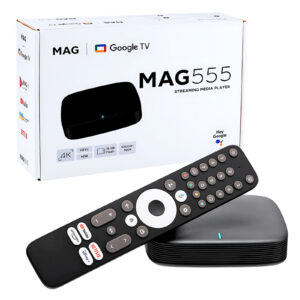
What Makes the MAG555 a Modern Smart Streaming Device?
The MAG555 4K streaming media player is designed for high-performance home entertainment powered by Google TV. It combines powerful hardware with Google’s smart ecosystem to deliver a smooth and intelligent streaming experience.
Key highlights include:
-
4K Ultra HD video playback
-
Google TV operating system
-
Voice control with Google Assistant
-
Built-in Chromecast functionality
-
Fast Amlogic chipset for smooth performance
Together, these features transform a standard television into a smart entertainment hub capable of running IPTV apps, streaming platforms, and smart home integrations.
Understanding Google Assistant on the MAG555
Google Assistant is an AI-powered voice assistant integrated into the MAG555 remote. It allows users to interact with their streaming device using natural speech.
Instead of manually searching for content, you can simply press the voice button on the remote and ask Google Assistant to perform tasks.
Examples include:
-
Searching for movies or TV shows
-
Opening streaming apps
-
Controlling playback
-
Checking news or weather
-
Managing connected smart home devices
Because Google Assistant is connected to the Google ecosystem, it can search across multiple apps simultaneously, helping users find content faster.
How Voice Search Works on the MAG555
The voice control system works through the microphone button on the remote control.
Here’s how the process works:
-
Press the Google Assistant button on the remote.
-
Speak your request clearly.
-
Google Assistant processes the command and performs the action instantly.
The system uses advanced cloud-based voice recognition and artificial intelligence to understand natural language commands.
This means you can speak normally instead of using rigid command phrases.
How to Enable Voice Control on the MAG555
Setting up Google Assistant on the MAG555 is simple and only takes a few minutes.
Connect the Device
Plug the MAG555 into your television using the HDMI cable and power adapter.
Sign In to Google TV
During the initial setup process, sign in with your Google account to activate Google services.
Pair the Bluetooth Remote
Make sure the MAG555 remote is paired properly with the device.
Activate Google Assistant
Follow the on-screen instructions to enable Google Assistant.
Once this setup is complete, voice search becomes available across supported apps and system features.
Popular Voice Commands You Can Try
Voice commands make navigating your entertainment system much faster.
Here are common commands users frequently use:
-
“Open YouTube.”
-
“Play trending movies.”
-
“Search for action movies.”
-
“Show comedy shows on Netflix.”
-
“Pause the video.”
-
“Turn the volume up.”
These commands help users access content instantly without browsing through menus.
Using Voice Search with IPTV and Streaming Apps
Voice control works across many streaming platforms available on Google TV.
Users can quickly:
-
Search live TV content
-
Launch IPTV apps
-
Discover trending movies or shows
-
Resume previously watched programs
-
Navigate streaming platforms faster
Because Google TV aggregates content from multiple apps, voice search often finds results across different platforms simultaneously.
This makes it easier to discover new content and switch between services.
Smart Home Control Through the MAG555
The MAG555 is not only a streaming device—it can also become part of your smart home ecosystem.
Using Google Assistant, users can control compatible smart devices directly from their television.
Examples include:
-
Turning lights on or off
-
Adjusting thermostats
-
Viewing security cameras
-
Controlling smart plugs or appliances
For households using Google Home devices, the MAG555 integrates seamlessly with existing smart home setups.
Voice Recognition Speed and Accuracy
Google Assistant uses powerful AI algorithms to process voice commands quickly and accurately.
The MAG555 benefits from:
-
Fast command recognition
-
Context-aware search results
-
Multi-language voice support
-
Continuous AI improvements
These features ensure that voice commands respond quickly, even when searching across multiple apps.
Privacy and Data Security
Voice assistants naturally raise questions about privacy. Google provides tools that allow users to manage their voice data.
Users can:
-
Review stored voice activity
-
Delete previous voice commands
-
Adjust voice recognition settings
-
Control microphone permissions
These privacy controls allow users to manage how their data is stored and used.
Fixing Common Voice Control Problems
If voice commands are not working properly, a few quick steps usually resolve the issue.
Check Internet Connectivity
Voice recognition requires a stable internet connection.
Restart the Streaming Device
Rebooting the device can solve temporary system issues.
Reconnect the Remote
Re-pair the remote if the microphone button stops responding.
Update the Software
Ensure your MAG555 firmware and Google TV software are up to date.
These quick fixes usually restore voice control functionality.
Why Voice Control Improves the Streaming Experience
Voice control significantly enhances usability and convenience.
Major benefits include:
-
Faster content discovery
-
Hands-free device control
-
Easier navigation for families
-
Improved accessibility for users of all ages
-
Smart home integration
Instead of scrolling through menus, users can simply ask for what they want.
Why the MAG555 Is a Powerful Google TV Streaming Device
The Raxxio MAG555 stands out because it combines strong hardware performance with Google’s advanced entertainment ecosystem.
Advantages include:
-
Official Google TV interface
-
Powerful Amlogic processor
-
Smooth 4K HDR streaming
-
Voice search powered by Google Assistant
-
Built-in Chromecast support
This combination delivers a fast and reliable streaming experience for IPTV users and streaming enthusiasts.
Frequently Asked Questions
Does the MAG555 support voice search?
Yes. The MAG555 includes built-in Google Assistant voice control through the remote.
Can I search movies and shows with voice commands?
Yes. Google Assistant can search across supported streaming apps to find movies, shows, or live content.
Can the MAG555 control smart home devices?
Yes. It can connect to compatible Google Home devices such as lights, thermostats, and cameras.
Is voice control available in multiple languages?
Yes. Google Assistant supports many languages, depending on your region settings.
Do I need a Google account to use Google Assistant?
Yes. A Google account is required to activate Google Assistant and access personalized recommendations.
Final Thoughts
Voice control is quickly becoming a core feature of modern streaming devices. With Google Assistant built directly into the remote, the Raxxio MAG555 Google TV streaming box allows users to control their entertainment using natural voice commands.
From searching movies and launching IPTV apps to controlling smart home devices, voice interaction makes streaming faster, easier, and more intuitive.
As streaming technology continues to evolve, devices like the MAG555 are helping create a smarter, voice-powered entertainment experience for the future.